How to Play Word Connections
Rules, controls, and practical solving strategies for Word Connections.
What Word Connections Is
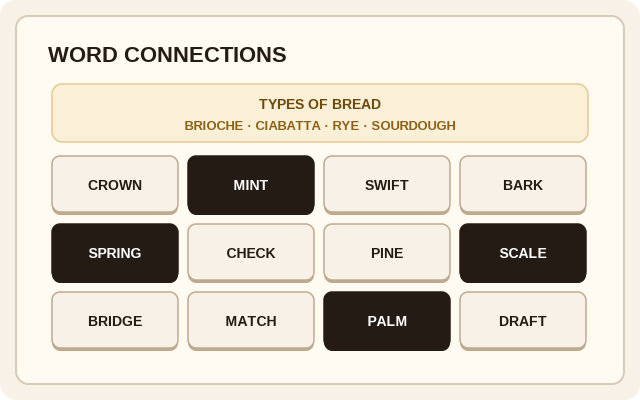
Word Connections is a 4×4 association puzzle built around lateral thinking and sharp reading. Every board lays out sixteen words that seem scattered at first glance. Beneath the surface, they divide neatly into four groups of four, each tied together by a single concrete link. Some links are straightforward categories like types of bread or evergreen trees, while the hardest tier leans on wordplay—such as hidden compound phrases, homophones, or shared prefixes.
This browser edition includes twelve handcrafted boards you can play in order or jump between anytime. No download or sign-up is needed, and every tile responds cleanly to a mouse click on desktop or a quick tap on a phone screen.
How to Play Word Connections
- Scan the 16-word grid for four words that clearly belong to the same set.
- Select four tiles to highlight them, then press Submit to test your group.
- Read the feedback: A correct group locks into a color-coded banner at the top of the board—yellow for the most direct category, green for moderate, blue for tricky, and purple for wordplay.
- Watch your four mistakes: An incorrect guess costs one mistake dot. If three of your four picks belong to the same hidden category, the board shows a One away! alert so you can swap just the odd word out.
- Use Shuffle and Deselect whenever a cluster looks misleading. Shuffling breaks visual bias and often exposes a connection sitting across opposite corners.
Smart Strategies for Tougher Boards
Watch out for red herrings. Good connection boards intentionally include five words that seem to fit one theme, or words with double meanings like bark, pitch, or spring. Before locking in a tempting quartet, glance across the remaining twelve tiles to see if one of your words is urgently needed elsewhere.
Count out the remaining sets mentally. When you are down to eight words, solve both final groups in your head before submitting. Checking whether the leftover four words genuinely share a clean theme saves you from wasting a mistake on a near miss.
Hunt for wordplay early when stuck. If four words resist any literal category, test whether they all precede or follow a common word (such as board, light, or house), share hidden palindromes, or sound like numbers when spoken aloud.
Respect the "One away!" signal. When three words match, resist clearing the whole selection. Ask which single word feels slightly looser than the other three, swap it with another candidate, and confirm the tie before submitting.
Playing on Phone or Computer
Word Connections runs smoothly in any modern mobile or desktop browser. On smaller screens, tap tiles directly and use the compact Shuffle, Deselect, and Submit bar just below the grid. Switch boards anytime from the top puzzle selector or press Next Puzzle right after finishing a round. Use the Fullscreen button below the stage whenever you want a focused board without distractions.